
What Is Technical SEO? A Simple Guide with Checklist and Examples
 13 Nov 2026
10 min read
The short answer: Technical SEO is the work that lets search engines find, crawl, render and index your website, so your content has a chance to rank. It covers crawl access, status codes, duplicate URLs, redirects, sitemaps, page speed, mobile pages, structured data and JavaScript. It does not make weak content rank, but problems here can stop good content being seen at all.
Table of Contents
Key takeaways
- Technical SEO is about access and understanding: can Google reach a page, read it, and choose the right version to show?
- Google lists three minimum requirements for indexing: Googlebot is not blocked, the page returns HTTP 200, and the page has indexable content. Even then, indexing is not guaranteed.
- Most small business sites do not have a crawl budget problem. They have duplicate URLs, slow templates, broken redirects and pages accidentally set to noindex.
- Start every audit in Google Search Console, then run a crawler, then fix in order of impact: indexing blockers first, speed and structured data later.
- A one-off audit is not enough: recheck after every redesign, plugin update or batch of new pages.
What is technical SEO?
Technical SEO is the part of search engine optimisation that deals with how a website is built and served, rather than what it says. Its job is to make sure search engines can crawl, understand and index the correct version of every page you want found.
It sits next to on-page SEO (the content) and off-page SEO (the reputation a site earns from links and mentions). The three depend on each other: a brilliant page that Google cannot index earns nothing, and a technically perfect page with thin content will not rank either.
| Part of SEO | The question it answers | Typical work |
|---|---|---|
| Technical SEO | Can search engines reach, read and index this page? | Crawl access, status codes, canonicals, redirects, sitemaps, speed, mobile, structured data |
| On-page SEO | Does this page answer the search well? | Keyword research, titles, headings, copy, internal links, images |
| Off-page SEO | Do other sites trust and mention this business? | Links, digital PR, reviews, business listings |
If you want the wider picture first, our guide to what SEO means in marketing explains how all three parts fit into a business’s growth plan.
Why does technical SEO matter?
Technical SEO matters because Google can only rank pages it has crawled and indexed. Google says Search works in three stages (crawling, indexing and serving results), and that not every page makes it through each stage.
Google’s technical requirements are short. Googlebot must not be blocked, the page must return an HTTP 200 (success) status code, and the page must have indexable content. Google adds that meeting these requirements does not mean a page will be indexed. That is the honest framing for technical SEO: it removes the reasons Google might skip or misread a page, and it gives your content a fair chance.
What does technical SEO cover?
Technical SEO covers eight areas: crawling, indexing, duplicate URLs, redirects, sitemaps, page speed, mobile and structured data, and JavaScript rendering. In our experience, the first four cause most problems on small business sites.
1. Crawling and robots.txt
Crawling is when a search engine bot downloads your pages. A robots.txt file tells bots which paths they may request. Google’s robots.txt documentation is clear that robots.txt manages crawler traffic and is not a way to keep a page out of Google. To keep a page out of search results, use a noindex tag or password protection.
2. Indexing and status codes
Indexing is when Google stores a page so it can appear in results. The usual blockers are a stray noindex tag (often left on after a site launch), pages that return errors, and “soft 404s”, where a page says “not found” but returns a 200 status.
3. Duplicate URLs and canonicals
The same content often lives at several addresses: with and without a trailing slash, with tracking parameters, or under an old slug. Google picks one as the canonical. Its guide to duplicate URLs ranks the signals: redirects and rel=”canonical” are strong signals, sitemap inclusion is a weak one, and robots.txt should not be used for canonicalisation.
4. Redirects and broken links
A 301 redirect tells Google a page has moved permanently. Problems come from redirect chains (A to B to C), redirects pointing at the home page instead of the closest match, and internal links that still point to old URLs. Every internal link should go straight to the final 200 URL.
5. XML sitemaps and site structure
An XML sitemap lists the canonical URLs you want indexed. According to Google’s sitemap documentation, one sitemap can hold up to 50,000 URLs or 50MB uncompressed, Google ignores the priority and changefreq values, and it only uses lastmod when the date is consistently accurate. Important pages should also be reachable within a few clicks through normal internal links.
6. Page speed and Core Web Vitals
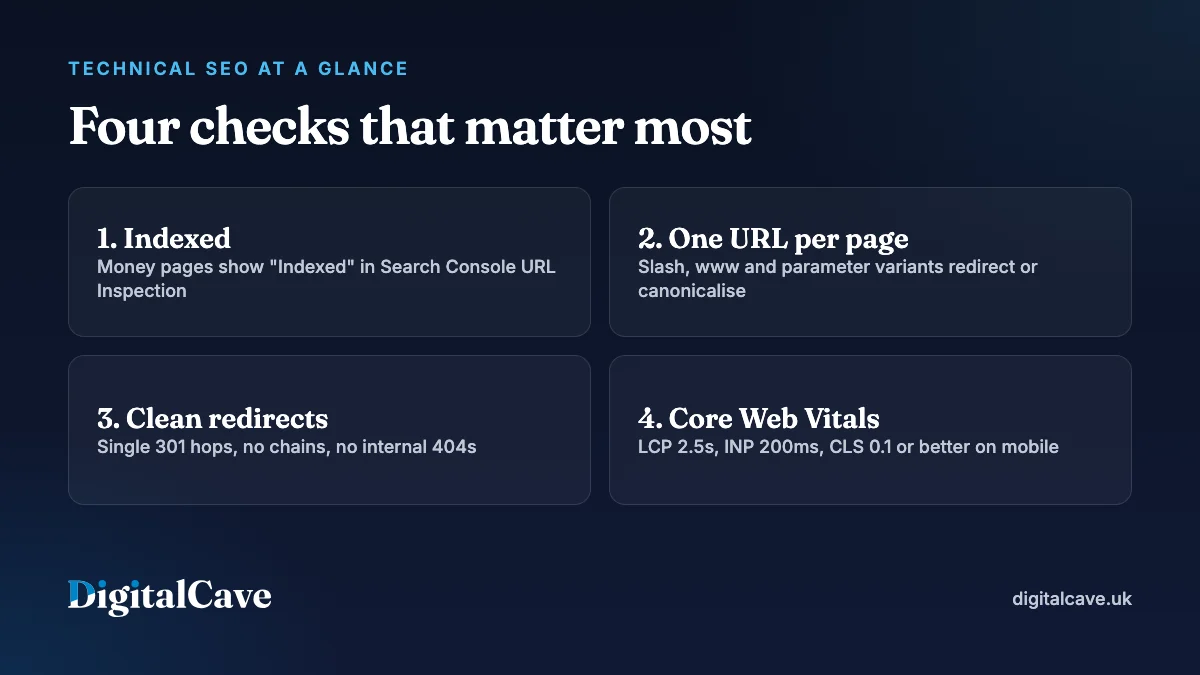
Core Web Vitals are Google’s three measures of loading, responsiveness and visual stability. web.dev’s Core Web Vitals guidance sets the “good” thresholds below, measured at the 75th percentile of page loads, with mobile and desktop counted separately.
| Metric | What it measures | Good | Common cause of a fail |
|---|---|---|---|
| Largest Contentful Paint (LCP) | How quickly the main content appears | 2.5 seconds or less | Huge hero images, slow hosting, render-blocking CSS |
| Interaction to Next Paint (INP) | How quickly the page responds to taps and clicks | 200 milliseconds or less | Heavy JavaScript, chat widgets, too many tracking scripts |
| Cumulative Layout Shift (CLS) | How much the layout jumps while loading | 0.1 or less | Images without dimensions, late-loading banners and fonts |
7. Mobile pages, HTTPS and structured data
Google uses the mobile version of a page, crawled with its smartphone bot, for indexing and ranking. So the mobile version needs the same content, structured data, titles and meta descriptions as the desktop version. HTTPS is expected on every page. Structured data (schema markup such as Organization, Article or BreadcrumbList) helps search engines understand what a page is about. It can make a page eligible for rich results, but it does not guarantee them.
8. JavaScript rendering and AI crawlers
Google’s JavaScript SEO guide explains that Google crawls, renders and then indexes JavaScript pages, and that pages can wait in a render queue. It still calls server-side rendering or pre-rendering a great idea, partly because not every bot runs JavaScript. That includes many AI crawlers. If you want to be cited by AI assistants, keep key content in the HTML. Our guide to appearing in Google AI Overviews covers the content side. One detail worth knowing: Google says blocking its Google-Extended token in robots.txt does not affect your inclusion or ranking in Google Search.
What should a technical SEO checklist include?
Work through this checklist in order. Priority reflects how much traffic each problem usually blocks.
| Check | Pass looks like | Where to check | Priority |
|---|---|---|---|
| Important pages are indexed | Money pages show “Indexed” in URL Inspection | Search Console: URL Inspection, Page indexing | Critical |
| No accidental noindex | Only thank-you, login and filter pages are noindex | Crawler noindex report, page source | Critical |
| robots.txt does not block key paths | CSS, JavaScript and page folders are crawlable | yoursite.com/robots.txt, Search Console robots.txt report | Critical |
| One URL per page | Slash, www and parameter variants redirect or canonicalise to one URL | Crawler duplicates report | High |
| Redirects are clean | Single 301 hops, no chains, no loops | Crawler redirect report | High |
| No broken internal links | Zero internal 404s | Crawler response codes | High |
| Sitemap is accurate | Only canonical, indexable 200 URLs, submitted in Search Console | Search Console: Sitemaps | High |
| Core Web Vitals pass on mobile | LCP, INP and CLS all “good” | PageSpeed Insights field data, Search Console | Medium |
| Structured data is valid | No errors; schema matches visible content | Rich Results Test, Schema Markup Validator | Medium |
| Key content is in the HTML | Headings and copy visible with JavaScript off | View source, URL Inspection rendered HTML | Medium |
How do you do a technical SEO audit?
A technical SEO audit follows the same order Google does: can it reach the page, can it index it, and does it understand it. Here is the process we use, which you can follow with free tools.
- Read Search Console first. Open the Page indexing report and note every reason pages are not indexed. “Excluded by noindex tag” on a service page is usually a mistake.
- Crawl the site. Export status codes, canonicals, noindex tags, redirect chains and click depth.
- Compare three lists. Put the crawl, the sitemap and the indexed pages side by side. Pages in the sitemap but not indexed, or indexed but not linked, are where problems hide.
- Check the money pages by hand. Run URL Inspection on your top 10 pages and look at the rendered HTML and the Google-selected canonical.
- Measure speed with field data. Use PageSpeed Insights and Search Console’s Core Web Vitals report, which reflect real visitors.
- Test structured data. Run the Rich Results Test on each template: home, service page, blog post.
- Prioritise by impact. Score each issue by pages affected and traffic at risk. Indexing blockers come before speed tweaks.
- Fix, then validate. Use Search Console’s “Validate fix” button and recheck the crawl. Keep a short log of what changed and when.
If you want a quick view before a full audit, our article on how to check a site’s SEO lists free checkers and what their scores do and do not tell you.
What do common technical SEO problems look like?
These are typical patterns on small business websites, not results from any one site.
| Problem | What you notice | Fix |
|---|---|---|
| Noindex left on after launch | New site gets almost no impressions | Remove the tag, resubmit the sitemap, request indexing for key pages |
| Old blog URLs still live | Two versions of a post split impressions | 301 the old URL to the new one and update internal links |
| Redesign changed every URL | Traffic drops after go-live | Map every old URL to its closest new page with single 301s |
| Hero image is 3MB | LCP fails on mobile | Resize, serve WebP or AVIF, add width and height, preload it |
| Location pages are near copies | “Duplicate, Google chose different canonical” | Give each page genuinely local content, or merge them |
Can you do technical SEO yourself?
Yes, for the basics. Any owner can set up Search Console, submit a sitemap, fix broken links and compress images.
Bring in help when the fix lives in the code: template-level speed problems, JavaScript rendering, a site migration or schema built into a theme. One wrong redirect rule or robots.txt line can affect every page at once.
Where DigitalCave fits
DigitalCave is an all-in-one web design, SEO and digital marketing agency, based in the West Midlands and serving Birmingham, Coventry and the UK. Because we build websites as well as optimise them, our technical work goes beyond a list of issues: we fix the templates, redirects and schema ourselves.
If you want a professional view, start with a free SEO audit of your website. For hands-on work, see our technical SEO audits and fixes in Birmingham, our technical SEO service in Coventry, or the wider SEO services it sits within. When you are ready, request a fixed-price quote.
Frequently asked questions
What is the difference between technical SEO and on-page SEO?
Technical SEO makes sure search engines can crawl, render and index a page. On-page SEO makes sure the content on that page answers the search well, through its copy, headings, titles and internal links. A page needs both: technical SEO gets it seen, on-page SEO earns the ranking.
How often should I do a technical SEO audit?
Run a full audit once or twice a year, and a quick check after any redesign, migration, theme change or major plugin update. Check Search Console’s Page indexing and Core Web Vitals reports monthly, because most problems show up there first.
Does page speed affect Google rankings?
Yes, but modestly. Google says Core Web Vitals are used by its ranking systems, but that it always seeks to show the most relevant content, even if the page experience is sub-par. Speed has a bigger effect on visitors: slow pages lose enquiries before anyone reads them.
What tools do I need for technical SEO?
Start with free tools: Google Search Console for indexing and Core Web Vitals, PageSpeed Insights for speed, the Rich Results Test for structured data, and a desktop crawler for status codes, redirects and duplicates.
Is technical SEO a one-off job?
No. The big fixes are often one-off, but websites change constantly. New pages, plugin updates, tracking scripts and redesigns all introduce new issues, so technical SEO needs regular monitoring and a recheck after every significant change.
Can technical SEO help my site appear in AI answers?
It helps with access. AI assistants and Google’s AI features can only use content their crawlers can reach and read, so clean HTML, fast pages and a robots.txt that allows the crawlers you want are the foundation. Being cited still depends on clear, trustworthy content.
In one line
Technical SEO makes sure Google can reach, read and index the right version of every page you care about, so fix indexing blockers first and recheck after every change.