
1 in 5 West Midlands Small Business Websites Don’t Work: Our 2026 Study
 26 Oct 2026
7 min read
26 Oct 2026
7 min read
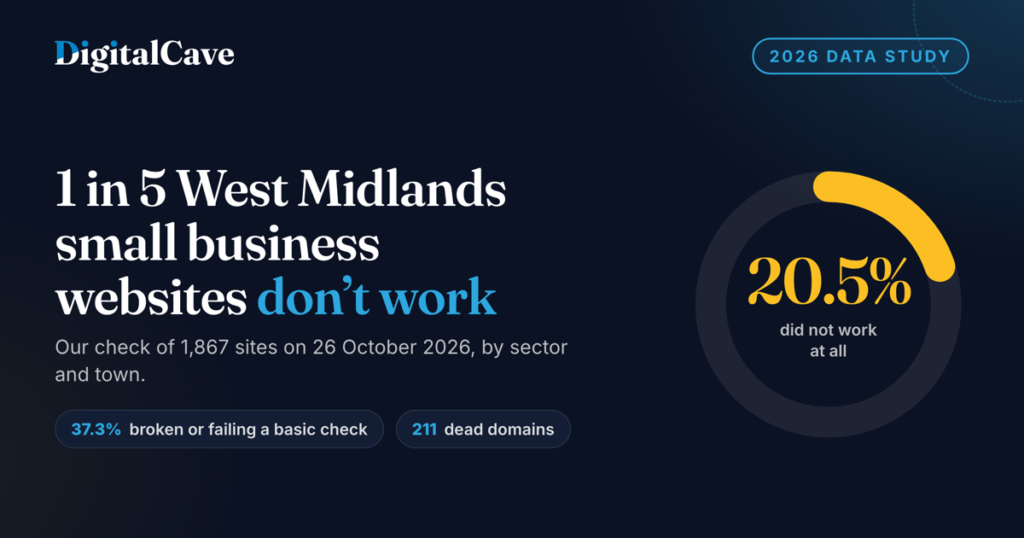
The short answer: on 26 October 2026 we checked 1,867 small business websites across the West Midlands. 382 of them did not work at all. That is 20.5%, or about 1 in 5. Add the sites that loaded but failed a basic check, and the figure rises to 697 sites, or 37.3%. That is more than a third.
By Rocky V, Head of Operations at DigitalCave. Data collected and checked on 26 October 2026.
Key findings
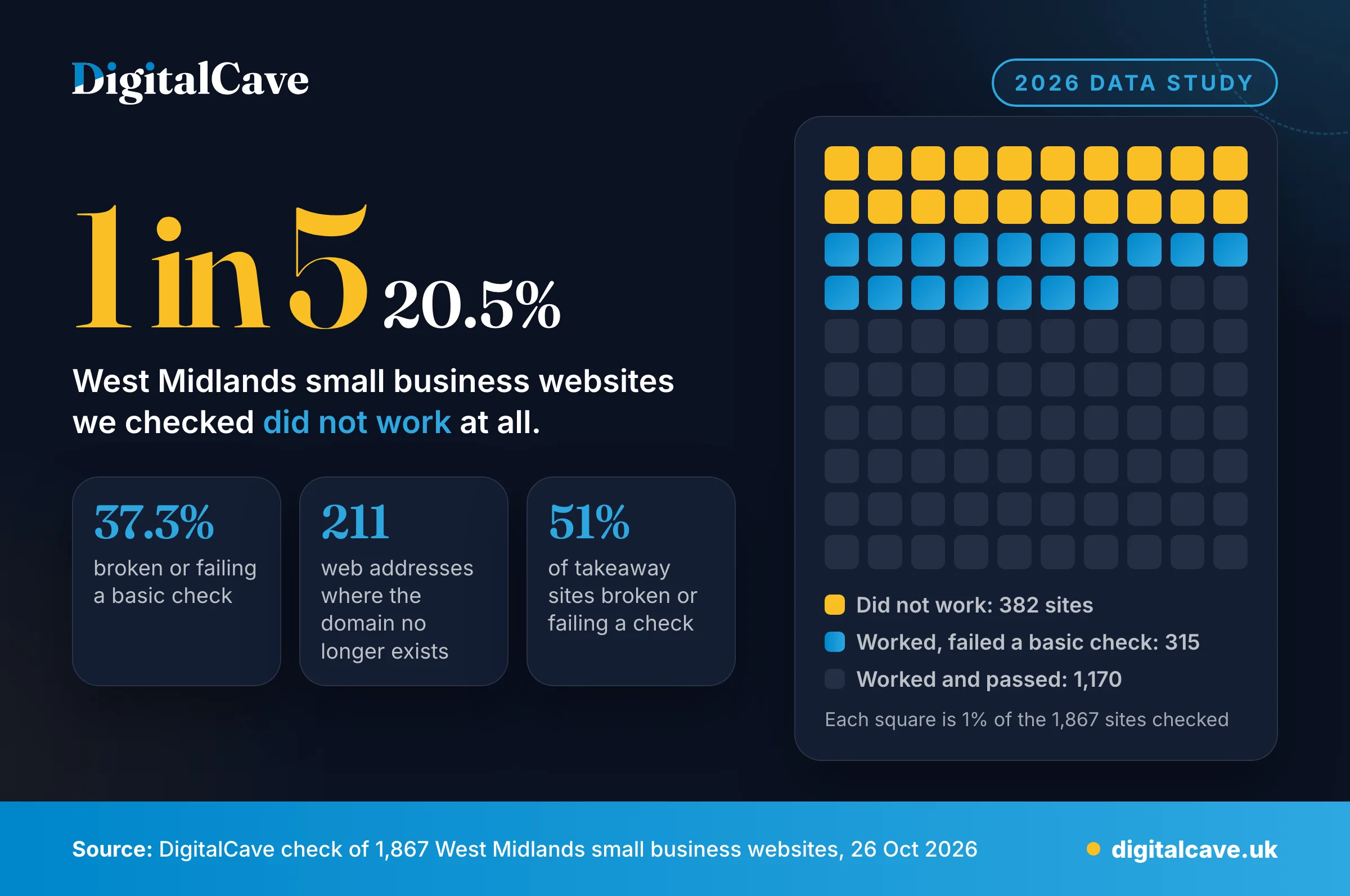
- 20.5% did not work. 382 of the 1,867 sites failed to show a working homepage, on two separate checks.
- 37.3% were broken or failing a basic check. That is 697 sites in total.
- 11.3% pointed to a domain that no longer exists. 211 sites. This was the biggest single cause by far.
- 51% of takeaway websites had a problem. Hairdressers and beauty salons were close behind at 49%.
What we checked and how
We started with OpenStreetMap, the free world map built by volunteers. Many businesses on it have a website address recorded. We took every business with a website inside a box drawn around the West Midlands region, from latitude 52.20 to 52.80 and longitude 2.45 to 1.20 west. That covers Birmingham, the Black Country, Solihull, Coventry and parts of Staffordshire, Worcestershire and Warwickshire. Each website address was counted once. That gave us 2,029 sites.
On 26 October 2026 we visited every homepage the way a normal web browser does. We waited up to 20 seconds and tried twice. Then every site that could not be reached or returned an error got a second, slower pass, with a fresh lookup of the address. A site only counts as broken if it failed both passes. 31 sites that failed the first time loaded on the second pass, and we counted them as working.
162 sites block automated checks, for example with a security challenge page or an “access denied” reply. We cannot tell whether those work for real visitors, so we left them out. That leaves 1,867 sites. Every percentage below is based on that number unless we say otherwise.
We counted a site as not working if one of these happened:
- Domain no longer exists. The web address does not lead anywhere on the internet at all.
- Site down. The address exists, but the server did not give a usable reply. It timed out, refused the connection or failed partway through.
- Page not found. Visitors get an error such as “404 not found” instead of the homepage.
- Server error. The server replies with an error (a 500 type code) instead of the page.
- Parked. A “domain for sale”, parking, “coming soon” or “under construction” page.
- Blank page. Fewer than 40 words and nothing that could load more content.
For the 1,485 sites that did work, we ran four basic checks:
- Set up for mobile. Does the homepage include the viewport tag? This is the line of code that tells a phone to fit the page to the screen. Without it, phones usually show a shrunken desktop page.
- Secure HTTPS. Does the site end up on a secure address with a valid certificate?
- Copyright year. Is the latest copyright year on the homepage 2023 or older? Sites that show no year at all were not counted as a problem.
- Speed. Did the homepage take more than 5 seconds to download? This measures the server and the download, not the time to draw the page, so real visitors may wait longer.
Results by problem type
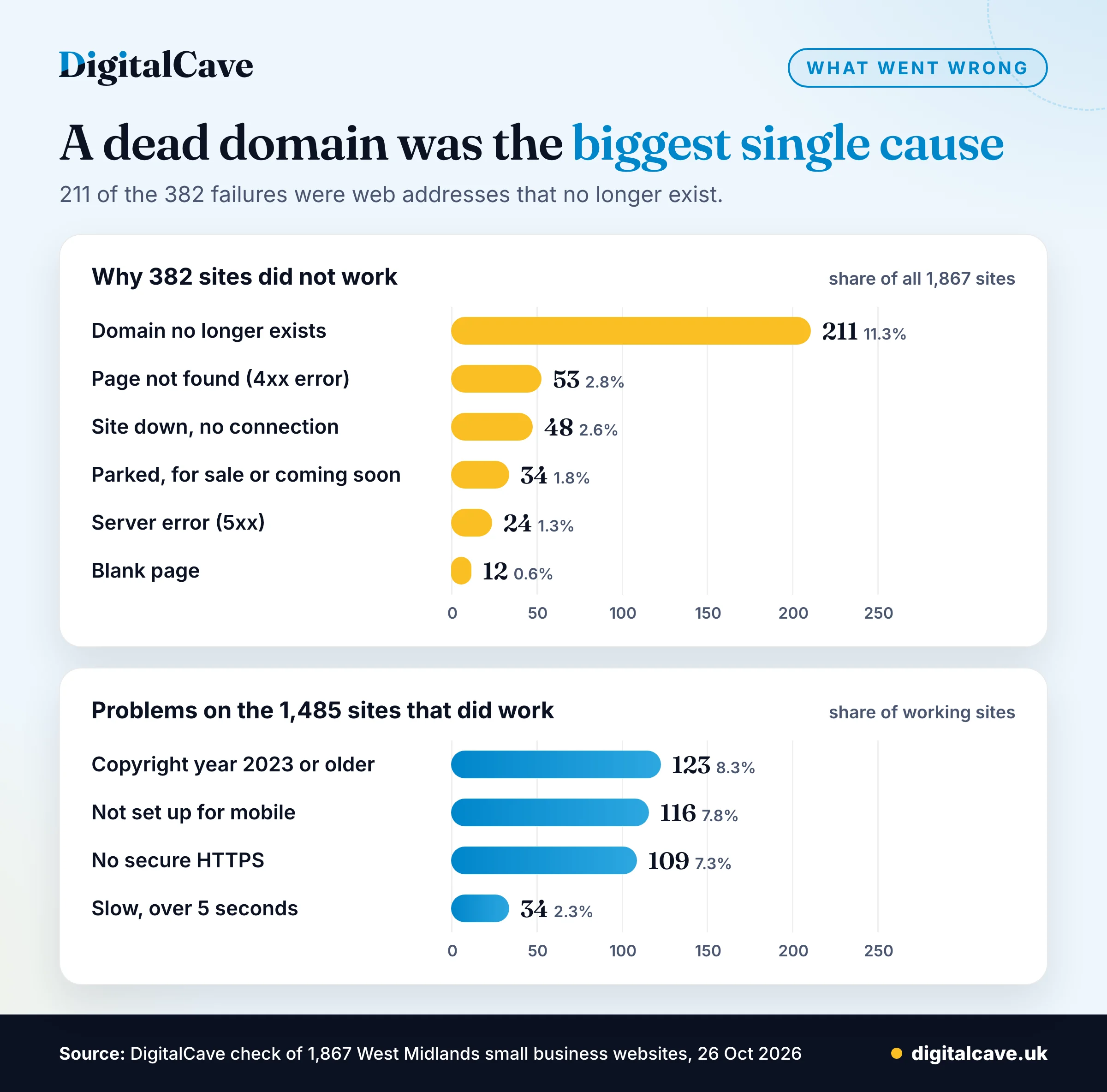
Dead domains were more than half of all failures: 211 of 382. Usually this means the domain was not renewed, or its settings were removed when a business changed supplier. Either way, every link, business card and online listing that uses the address now leads nowhere. If the whole domain has lapsed, email addresses on it stop working too.
| Why the site did not work | Sites | Share of all 1,867 sites |
|---|---|---|
| Domain no longer exists | 211 | 11.3% |
| Page not found (404 or similar) | 53 | 2.8% |
| Site down, no connection | 48 | 2.6% |
| Parked, for sale or coming soon | 34 | 1.8% |
| Server error | 24 | 1.3% |
| Blank page | 12 | 0.6% |
| Total not working | 382 | 20.5% |
A site that loads can still put customers off. Of the 1,485 working sites, 315 (21.2%) failed at least one basic check. Some failed more than one.
| Basic check failed | Sites | Share of 1,485 working sites |
|---|---|---|
| Copyright year 2023 or older | 123 | 8.3% |
| Not set up for mobile | 116 | 7.8% |
| No secure HTTPS | 109 | 7.3% |
| Slow (over 5 seconds) | 34 | 2.3% |
Worst sectors
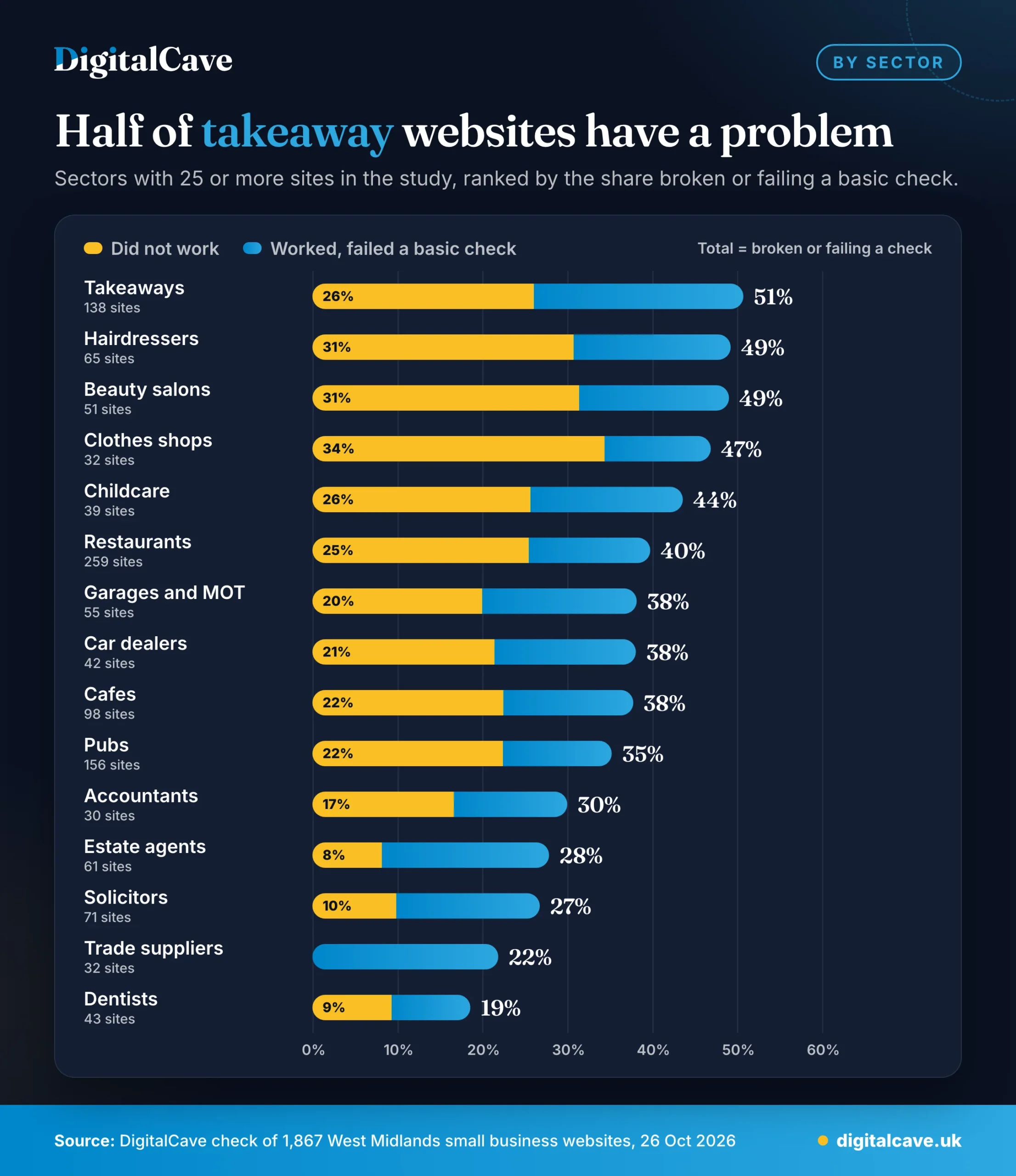
We only compared sectors with 25 or more sites in the study. Takeaways came out worst: 70 of 138 sites were broken or failed a basic check. Clothes shops had the highest share that did not work at all, at 34%.
Dentists, trade suppliers, solicitors and estate agents did best. None of the 32 trade supplier sites failed outright. Our reading is that high street businesses often take most bookings by phone, social media or delivery apps, so a broken website can go unnoticed for months. That is our interpretation, not something the data proves.
| Sector | Sites checked | Did not work | Broken or failing a check |
|---|---|---|---|
| Takeaways | 138 | 26% | 51% |
| Hairdressers | 65 | 31% | 49% |
| Beauty salons | 51 | 31% | 49% |
| Clothes shops | 32 | 34% | 47% |
| Childcare | 39 | 26% | 44% |
| Restaurants | 259 | 25% | 40% |
| Garages and MOT | 55 | 20% | 38% |
| Car dealers | 42 | 21% | 38% |
| Cafes | 98 | 22% | 38% |
| Pubs | 156 | 22% | 35% |
| Accountants | 30 | 17% | 30% |
| Estate agents | 61 | 8% | 28% |
| Solicitors | 71 | 10% | 27% |
| Trade suppliers | 32 | 0% | 22% |
| Dentists | 43 | 9% | 19% |
Towns
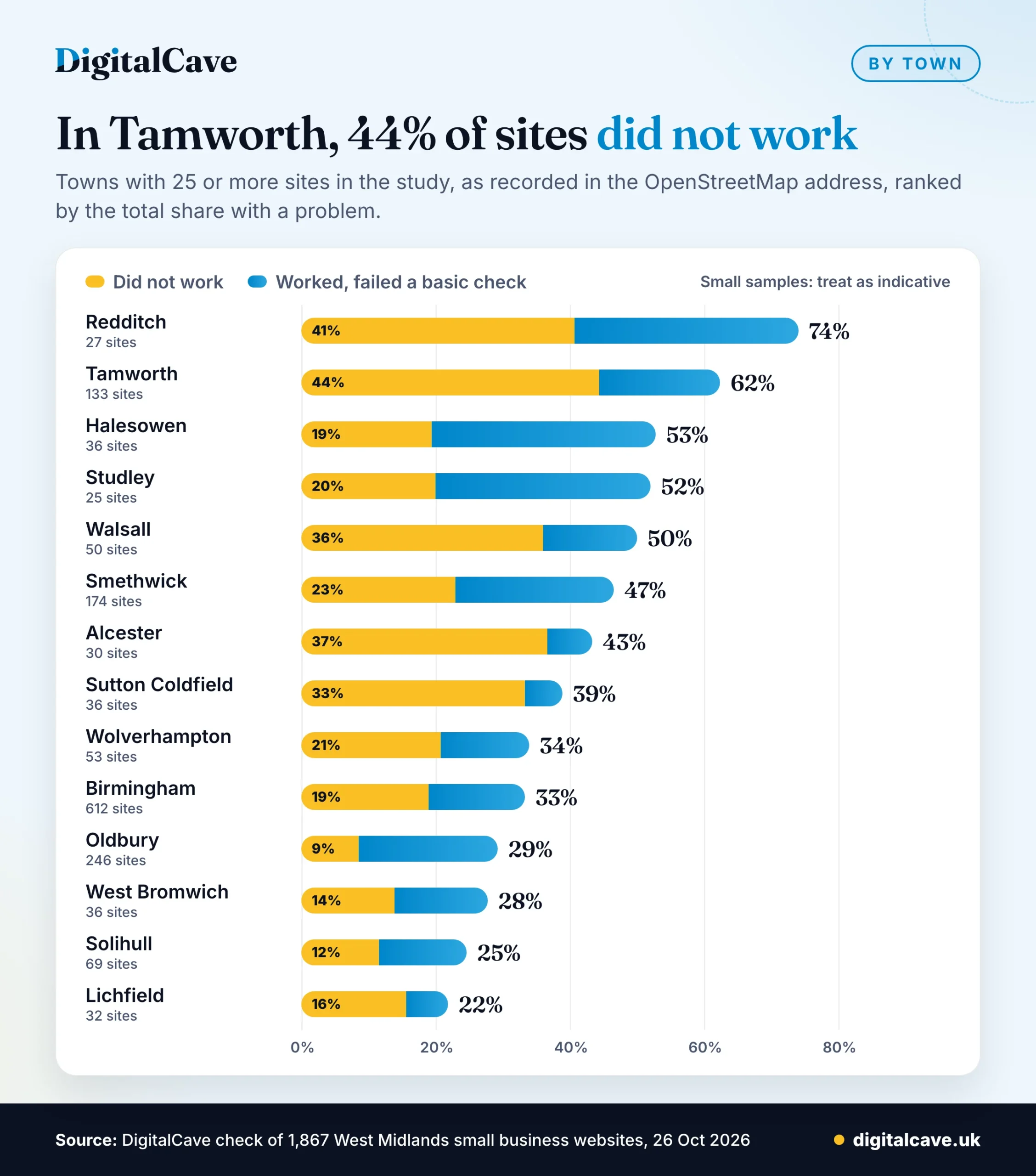
The town is the one written in each business’s OpenStreetMap address, so Sutton Coldfield appears on its own rather than as part of Birmingham. Again, we only show towns with 25 or more sites.
Tamworth had the highest share of sites that did not work: 44% of 133. Most of those were dead domains. Redditch had the highest share with any problem, at 74%, but from only 27 sites. Birmingham, with 612 sites, sat close to the regional average: 19% did not work and 33% had a problem. Oldbury had the lowest share that did not work, at 9%.
Treat town figures with care. The samples are small, and part of the difference comes from when local volunteers mapped each area. Businesses recorded years ago are more likely to have old web addresses.
| Town | Sites checked | Did not work | Broken or failing a check |
|---|---|---|---|
| Redditch | 27 | 41% | 74% |
| Tamworth | 133 | 44% | 62% |
| Halesowen | 36 | 19% | 53% |
| Studley | 25 | 20% | 52% |
| Walsall | 50 | 36% | 50% |
| Smethwick | 174 | 23% | 47% |
| Alcester | 30 | 37% | 43% |
| Sutton Coldfield | 36 | 33% | 39% |
| Wolverhampton | 53 | 21% | 34% |
| Birmingham | 612 | 19% | 33% |
| Oldbury | 246 | 9% | 29% |
| West Bromwich | 36 | 14% | 28% |
| Solihull | 69 | 12% | 25% |
| Lichfield | 32 | 16% | 22% |
What you can check in 5 minutes
You do not need any technical skill for these checks. You need a phone and the login for wherever you bought your web address.
- Load it on your phone. Use mobile data, not your office wifi. Type the address by hand, with and without “www”. Does the homepage appear within a few seconds?
- Check your domain renewal date. Log in to the company you bought the domain from. Turn on auto-renew and check the card on file has not expired. Dead domains were more than half of the failures we found.
- Look at the address bar. If your browser says “Not secure”, your site has no working HTTPS. Most hosting companies can switch on a free certificate.
- Do the thumb test. Does the text fit the screen without zooming? Can you tap the phone number and the main button easily?
- Scroll to the footer. An old copyright year can make a business look closed when it is not. Update it, or ask your web person to make it update itself.
- Check every place your web address is listed. Your Google Business Profile, social media profiles, directories and printed material should all point to the address that works today. Our sample came from a public map listing, and 1 in 5 of those addresses did not work.
- Set a reminder. Repeat these checks every three months.
If something on this list fails and you would rather not fix it yourself, this is how our web design service in Birmingham works.
About this study
- Sample: 2,029 business websites listed on OpenStreetMap inside a box around the West Midlands region (latitude 52.20 to 52.80, longitude 2.45 to 1.20 west). Each web address counted once.
- Date: checked on 26 October 2026, in two passes. A site counts as not working only if it failed both.
- Exclusions: 162 sites that block automated checks were left out, leaving 1,867.
- What we tested: the homepage only. We did not test contact forms, booking systems or other pages.
- Limits: OpenStreetMap is not a random sample of all businesses. It leans towards the places volunteers map most, such as restaurants, pubs, takeaways and cafes, which make up about a third of the sites. Listings can be out of date, so some dead addresses may belong to businesses that have since closed, moved or changed web address. Each result is a snapshot of one day.
- Privacy: we do not publish or share the list of individual businesses or websites.
Using these figures
Journalists, researchers and councils are welcome to use these figures and charts. Please credit DigitalCave and link to this page. If you need a different breakdown from the same data, contact us and we will check whether the sample is large enough to support it.